Running a small business means keeping systems available, data protected, and staff productive, without the overhead of a large internal IT team. Fully managed IT support is designed to take day-to-day technology responsibility off your plate while keeping your operations steady and secure. This guide explains what fully managed IT support includes, how it works for US small businesses, and how to decide if it fits your needs.
What Fully Managed IT Support Means for Small Businesses
It is an ongoing service where a provider assumes responsibility for monitoring, maintaining, and supporting your IT environment. Instead of calling for help only when something breaks, your systems are watched continuously and issues are addressed before they disrupt work.
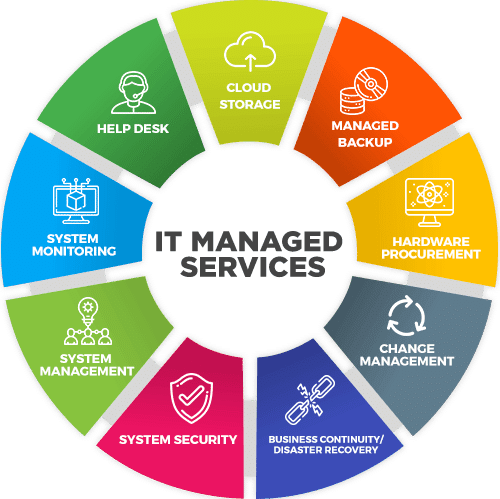
For small businesses, fully-managed IT support typically covers:
- Proactive monitoring of servers, networks, and devices
- End-user help desk support
- Security controls and updates
- Backup and recovery planning
- Clear service commitments through SLAs
Industry definitions consistently describe managed services as proactive and subscription-based, rather than reactive or hourly, which helps businesses predict costs and reduce downtime.
Problems Small Businesses Face Without Fully Managed IT Support
Many small businesses rely on informal or break-fix IT help. Over time, this approach creates avoidable risk and cost.
Common challenges include:
- Unplanned downtime: Hardware or software failures halt operations until someone is available to fix them. Even brief outages can disrupt sales and customer service. The average cost of IT downtime for small businesses can reach thousands of dollars per hour when lost productivity and recovery are considered.
- Security gaps: Systems that are not monitored or patched regularly are more likely to be compromised. According to the U.S. Small Business Administration, many cyber incidents affect small firms that lack dedicated security oversight.
- Unclear responsibility: When issues arise, staff may not know who owns the problem or how quickly it will be addressed.
Fully managed IT support replaces uncertainty with defined processes and accountability.
What Is Included
Service scope can vary by provider, but most offerings include the core areas below.
24/7 System Monitoring and Issue Resolution
Providers use monitoring tools to track system health, performance, and alerts around the clock. This approach allows many issues to be resolved before users notice them. Proactive monitoring is widely recognized as a primary benefit of managed services because it reduces downtime and improves reliability.
Help Desk and End-User Support
Employees receive access to a help desk for day-to-day issues such as login problems, software errors, or device setup. Centralized support improves response times and reduces the burden on internal staff, a benefit highlighted in SMB IT service studies.
IT Asset and Device Management
It usually includes oversight of laptops, desktops, servers, and network equipment. Regular updates and patching help maintain stability and reduce exposure to known vulnerabilities, which the Cybersecurity and Infrastructure Security Agency identifies as a key control for risk reduction.
How SLAs Work in Fully Managed IT Support
A Service Level Agreement (SLA) defines how quickly a provider responds to and resolves issues. For small businesses, SLAs add clarity and set expectations.
Typical SLA elements include:
- Response time: How quickly support acknowledges an issue
- Resolution targets: Expected time to restore service
- Availability commitments: Hours of coverage and escalation paths
Clear SLAs are a common best practice in managed services because they align provider performance with business needs.
Cybersecurity Coverage Within Fully Managed IT Support
Security is a core component of fully managed IT support, especially for small businesses that handle customer data or rely on cloud services.
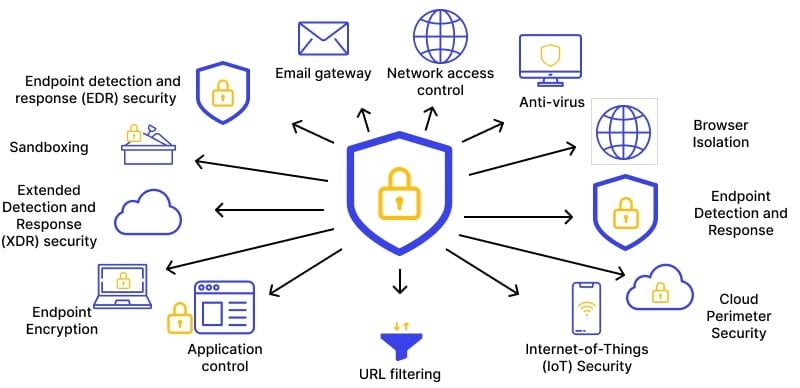
Endpoint Protection and Monitoring
Managed antivirus and endpoint detection tools help identify suspicious activity early. Federal guidance notes that continuous monitoring is a foundational security practice.
Email and Access Controls
Email remains a common entry point for attacks. Managed IT providers often implement spam filtering, authentication controls, and access policies to reduce risk, aligning with recommendations from the National Institute of Standards and Technology.
Ongoing Security Updates
Regular patching closes known security gaps. Studies consistently show that unpatched systems are more likely to be compromised.
Compliance Support for US Small Businesses
Many small businesses must follow industry or regulatory standards, even if they are not large enterprises. Fully managed IT support helps maintain technical controls that support compliance efforts.
Examples include:
- HIPAA: Safeguards for healthcare data
- PCI DSS: Controls for payment card data
- SOC readiness: Documentation and access controls for audits
While compliance is not guaranteed by IT services alone, managed IT helps maintain system configurations and records that regulators expect, as outlined by the Federal Trade Commission’s data protection guidance.
Uptime Management and Business Continuity
System availability directly affects revenue and customer trust. Fully managed IT support focuses on keeping systems running through maintenance, monitoring, and redundancy.
Regular maintenance and performance checks reduce the likelihood of outages. Research from IT operations firms shows that proactive maintenance lowers incident rates compared to reactive models.
Disaster Recovery and Backup Planning
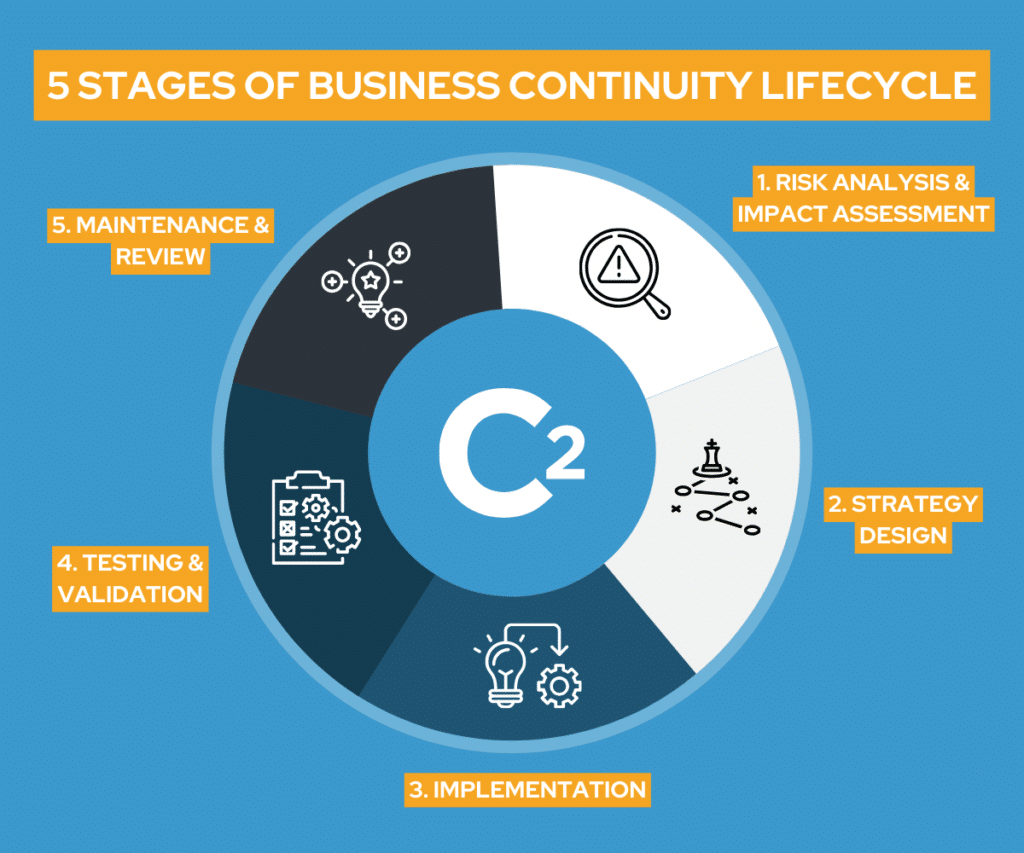
Backups protect data, but recovery planning determines how quickly a business can resume work after an incident.
Fully managed IT support typically includes:
- Scheduled, monitored backups
- Offsite or cloud storage
- Documented recovery procedures
The importance of tested recovery plans is emphasized by the U.S. Department of Homeland Security, which notes that recovery speed is critical to minimizing operational disruption.
Onboarding Process for Fully Managed IT Support
A structured onboarding process sets expectations and reduces disruption.
Most providers follow steps such as:
- Environment assessment: Inventory of systems and risks
- Documentation: Network diagrams, access lists, and procedures
- Tool deployment: Monitoring, security, and support platforms
- Staff orientation: How to request support and report issues
Clear onboarding reduces future issues and aligns with managed service best practices outlined by industry groups.
Local vs Remote Fully Managed IT Support
Remote tools handle many issues efficiently, but local presence still matters for certain situations. Hardware failures, office moves, and network changes often require hands-on help.
Many small businesses benefit from providers that combine remote services with onsite IT support, allowing faster resolution when physical access is needed. Local availability is often cited as a differentiator in SMB IT service selection.
Fully Managed IT Support vs Break-Fix IT
| Aspect | Fully Managed IT Support | Break-Fix IT |
| Cost model | Predictable monthly fee | Variable, per incident |
| Issue handling | Proactive monitoring | Reactive response |
| Security posture | Ongoing controls | Often minimal |
| Planning | Long-term | Short-term |
This comparison reflects widely accepted differences outlined in managed services research (CompTIA).
Is Fully Managed IT Support Right for Your Small Business?
Fully managed IT support often makes sense if:
- Technology is critical to daily operations
- Staff rely on cloud tools and remote access
- Security and compliance requirements are increasing
- Growth is stretching informal IT processes
For many SMBs, moving to managed services provides stability and frees internal teams to focus on business priorities, a benefit noted in multiple SMB technology adoption studies.
How to Choose a Local Fully Managed IT Support Provider
When evaluating providers, small business owners should look for:
- Clear service scope and SLAs
- Transparent communication
- Local availability when needed
- Experience with similar business sizes
The U.S. Small Business Administration recommends selecting vendors that understand your operational context and can document service expectations clearly.
Key Takeaways for Small Business Owners
Fully managed IT support provides a structured, proactive way to manage technology without building an internal department. For US small businesses, it offers predictable costs, stronger security practices, and clearer accountability—key factors for steady operations.
Frequently Asked Questions About Fully Managed IT Support
1. What does fully managed IT support include for small businesses?
It typically includes monitoring, help desk support, security controls, backups, and maintenance. These services are designed to reduce downtime and improve reliability, which industry research identifies as core managed service outcomes.
2. How does fully managed IT support improve security?
Providers implement monitoring, updates, and access controls that reduce exposure to common threats. Federal guidance highlights continuous monitoring and patching as essential security practices.
3. Is fully managed IT support suitable for very small teams?
Yes. Small teams often benefit because they gain access to structured support without hiring in-house staff, a model discussed in SMB technology adoption research..
4. How long does onboarding usually take?
Onboarding can take from a few days to several weeks, depending on system complexity. Industry best practices stress thorough assessment and documentation to reduce future issues.
5. Does fully managed IT support replace the need for internal IT staff?
It can reduce the need for internal resources, but some businesses retain staff for strategic oversight. Managed services are commonly used to complement internal roles rather than eliminate them, according to IT operations research.
